 oneM2M TR-0081Release Notes diff from v0.2.0 to v0.1.0oneM2M TR-0081Release Notes diff from v0.2.0 to v0.1.0
Agentic AI is an emerging field that is gaining increasing attention across the AI community. According to ISO/IEC 22989:2022 [i.17], an AI agent is defined as an automated entity that senses and responds to its environment and takes actions to achieve its goals.
Agentic AI systems utilize foundation models across various scales, modalities, and adaptations capable of multi-step reasoning through chain-of-thought approaches to decompose complex problems into manageable steps.
Foundation model-based agents are limited in their knowledge of the environment. They have no direct access to real-time information or data that was not part of their training. AI agents also do not inherently have access to data from the cyber-physical world, such as sensor readings. However, newer generations of foundation models used by AI agents are increasingly capable of tool calling, that is, invoking local software functions, for example to access external data sources.
The models do not necessarily have to be co-located with the agent and can run in the cloud.
The Model Context Protocol (MCP) [i.18] is an open standard and open-source framework for creating a unified interface through which models with language capabilities can seamlessly interact with external resources, including data sources and computational capabilities.
MCP enables AI agents to interact with external systems, such as those providing access to search engines, databases, or IoT platforms. MCP enables applications to provide context to various kind of language models in the form of human-readable API or functionality descriptions.
Figure 5.2‑1 shows an architecture overview of the Model Context Protocol. AI agents use MCP to interact with external software services via MCP servers that expose API functionalities.
The Model Context Protocol follows a client-server architecture, allowing an MCP Host application to connect to multiple servers. The interfaces of the non-AI software are exposed through an MCP Server. The AI agent may have one or more MCP Client(s). MCP clients connect to their corresponding servers in a one-to-one relationship.
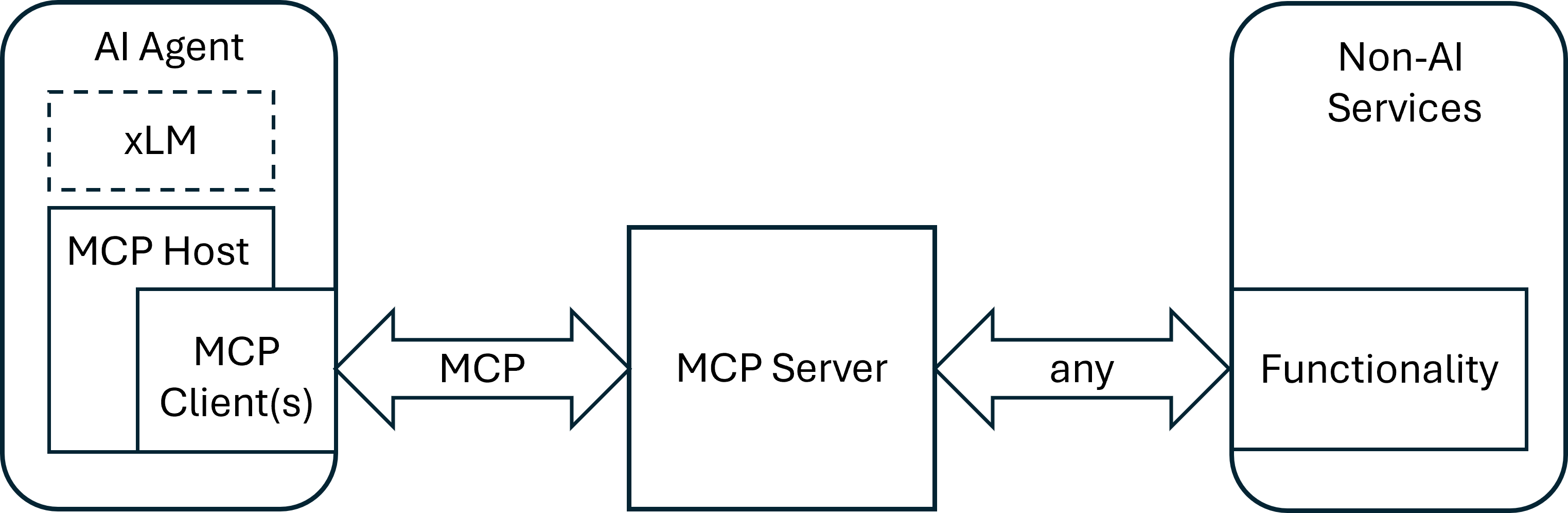

Figure 5.2‑1: Architecture overview
The Model Context Protocol supports two primary transport mechanisms: STDIO (Standard Input/Output) and HTTP [i.19] combined with SSE (Server-Sent Events) [i.20].
The STDIO mechanism uses standard input and output streams and is typically used for direct inter-process communication on the same machine, delivering optimal performance without network overhead.
In contrast, the HTTP with SSE mechanism relies on HTTP for communication, with server-sent events for server-to-client messages and POST requests for client-to-server communication, making it suitable for distributed setups. Both local and distributed communication modes use JSON-RPC 2.0 [i.21] as the message format for data transmission.
The Model Context Protocol defines a lifecycle for client-server connections, as shown in figure 5.4‑1, ensuring clear capability negotiation and consistent state management throughout the session.
Initialization: Negotiation of supported features and agreement on the protocol version
Operation: Standard communication according to the agreed protocol
Shutdown: Clean and orderly termination of the connection
The MCP protocol enables three different kinds of function calls:
Tools: MCP tools are server-side functions provided by MCP servers that allow LLMs to perform actions and operations on external systems which can modify states or trigger processes.
Resources: MCP resources provide a structured way for MCP servers to expose read-only data to LLMs. Typical use cases include requests like "Get customer details for account XYZ" or "Fetch the latest webcam image", receiving existing content without performing actions.
Prompts: MCP prompts are reusable instruction templates provided by MCP servers that guide LLMs to handle specific tasks with consistent expertise, combining these pre-defined instructions with user input to create complete, contextualized requests.
All server-side functions share the characteristic that the agent first requests a list of available functions and then selects and invokes the appropriate one.
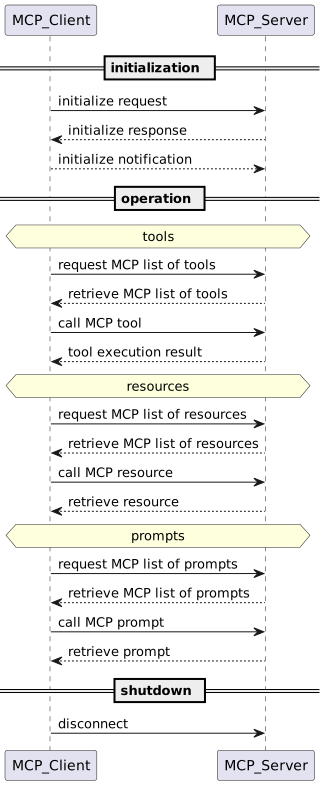

Figure 5.4‑1: Lifecycle phases
A very simple scenario for the introduction of MCP is "basic API wrapping". In this case, more complex function calls, authentication and authorization, as well as security measures are not considered. The focus is on the core functionality, specifically the operational aspects of the MCP protocol.
Figure 5.4.1‑1 illustrates a simple MCP call flow. In this case, a local weather station API is connected to an AI Agent using MCP. A user can interact with the AI Agent to discuss the current indoor climate, effectively serving as a local weather chatbot.
Note: For querying passive data such as temperature, MCP's 'resource' function could be utilized. However, this example uses the 'tools' function for simplicity and because tools are available on most MCP servers. The flow diagram illustrates only the successful execution path, omitting error or alternative paths.
Involved Services and Applications
Call Flow Description
The user asks via the AI App:"How warm is it right now?" using an HTTP POST request to the "/run" endpoint of the AI Agent.
The AI Agent receives the request and forwards it to its LLM for processing (not shown in diagram). The AI Agent's instructions for the LLM specify that it may use available tools and invoke them via MCP.
If the LLM decides to use MCP functions, the AI Agent requests a list of available tools from the MCP Server using an HTTP POST request to the "/message" endpoint along with a "session_id". Note: Session handling between AI Agent and MCP Server as well as between MCP Server and API is handled on HTTP-level.
The MCP Server responds to the request with "HTTP 202 Accepted".
The MCP Server sends the list of available tools along with a detailed description in human-readable text to the AI Agent in a server-sent event. The RPC message is shown in figure 5.4.1‑2.
The AI Agent chooses with the help of its LLM the most appropriate tool from the list in order to fulfill the user request (not shown in diagram).
The AI Agent calls the selected tool on the MCP Server using an HTTP POST request. The RPC message contained within is shown in Figure 5.4.1‑3.
The MCP Server responds to the request with "HTTP 202 Accepted".
The MCP Server calls the local weather station API with an HTTP GET request. The result contains a complete set of different local climate values.
The MCP Server sends the complete set of data to the AI Agent in a server-sent event.
The AI Agent processes the received data and, with the help of its LLM, formulates a textual response for the user (not shown in diagram).
The AI App receives the textual response from the AI Agent in HTTP 200 OK response.
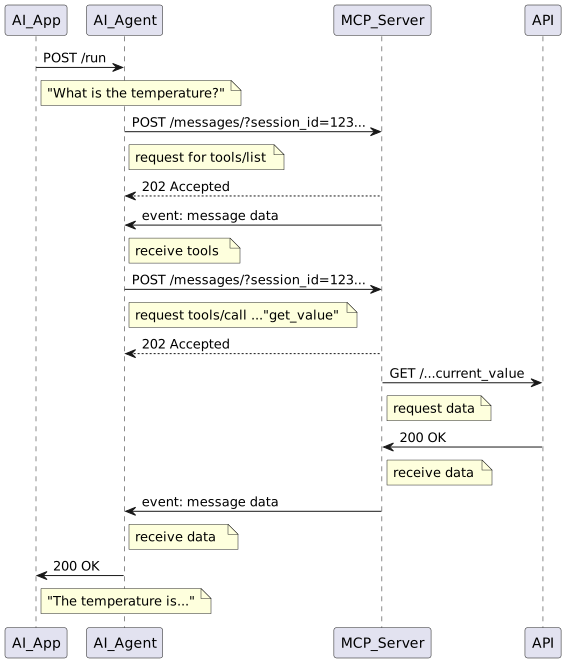

Figure 5.4.1‑1: Call flow example from AI Application to API
{
  "jsonrpc": "2.0",
  "id": 7,
  "result": {
    "tools": [
      {
        "name": "get_climate",
        "description": "Returns the current climate data from a weather station with different sensors.\n\nSensor Data Structure Overview:\nThe data comes from a multi-zone environmental sensor system and is formatted as a nested dictionary (similar to JSON). Each top-level key represents a physical location or sensor module. The values are sub-dictionaries containing measurements and status information for that location.\n\n1. General Structure\n{\n  \"Location/Sensor\": {\n    \"Measurement1\": value1,\n    \"Measurement2\": value2,\n    ...\n  },\n  ...\n}\n\n2. Locations and Typical Measurements\nIndoor\nTypical keys:\n- Temperature data (Temperature, min_temp, max_temp, temp_trend)\n- Air quality (CO2)\n- Humidity (Humidity)\n- Noise level (Noise)\n- Pressure (Pressure, AbsolutePressure, pressure_trend)\n- Timestamps for temp extremes (date_max_temp, date_min_temp)\n- Wi-Fi status (wifi_status)\n- Timestamp of last update (When)\n\nBedroom\nTypical keys:\n- Temperature data (including trend and min/max)\n- Humidity\n- CO₂ concentration\n- Battery status (battery_vp, battery_percent)\n- Radio frequency connection status (rf_status)\n- Timestamp (When)\n\nBalcony\nTypical keys:\n- Temperature data (with trend and min/max)\n- Humidity\n- Battery and RF status\n- Timestamp\n\nRain\nTypical keys:\n- Rainfall (Rain, sum_rain_1, sum_rain_24)\n- Battery and RF status\n- Timestamp\n\n3. General Characteristics\n- Values are either numeric or categorical (e.g., 'temp_trend': 'up', 'pressure_trend': 'down').\n- Time values are Unix timestamps.\n- Sensors report both environmental data and system status (connectivity, power, etc.).\n- Trend indicators describe simple directional change over time (e.g., 'up', 'down', 'stable').",
        "inputSchema": {
          "properties": {},
          "title": "get_climateArguments",
          "type": "object"
        }
      }
    ]
  }
}
Figure 5.4.1‑2: JSON-RPC message example sent from the MCP Server to the AI Agent listing available tools. In this example there is only one tool available.
{
  "jsonrpc": "2.0",
  "id": 8,
  "method": "tools/call",
  "params": {
    "name": "get_climate",
    "arguments": {}
  }
}
Figure 5.4.1‑3: JSON-RPC message example sent from the AI Agent to the MCP Server to invoke a tool from the list.