 oneM2M TS-0010Release Notes diff from v5.0.0 to v5.0.0oneM2M TS-0010Release Notes diff from v5.0.0 to v5.0.0
In this clause the use of MQTT is profiled and the key elements of the binding are defined:
For more information on MQTT itself see Annex A or refer to the MQTT specification [1].
MQTT includes reliability features which allow recovery from loss of network connectivity without requiring explicit involvement of the applications that are using it, however to do this it requires an underlying network protocol that provides ordered, lossless, bi-directional connections. The MQTT standard [1] allows a choice of underlying protocol. The present document restricts this choice: it shall be one of the following:
See the MQTT standard [1] for considerations on how to use these protocols with MQTT.
In order to communicate, the two client parties (AE and CSE or CSE and CSE) shall connect to a common MQTT server. The MQTT server shall be hosted in one of the two nodes or shall exist as an independent external entity, following one of the two scenarios shown in clause 5.2.
Once each party has located the address of the MQTT server, it then connects to it using the standard MQTT CONNECT Control Packet.
An MQTT Control Packet consists of up to three parts: a fixed header, a variable header, and a payload as shown in Figure 6.3.0‑1.


Figure 6.3.0‑1: Format of MQTT Control Packet
A variable header for the MQTT CONNECT Packet consists of four fields in the following order: Protocol Name, Protocol Level, Connect Flags and Keep Alive as shown in Figure 6.3.1‑1.
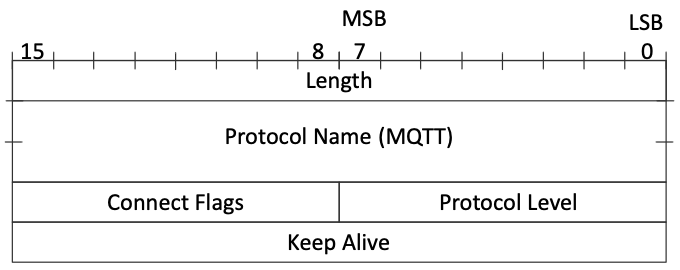

Figure 6.3.1‑1: Variable header of MQTT CONNECT Packet
The value of Protocol Name field is "MQTT". The value of the Protocol Level field for the MQTT version 3.1.1 of the protocol is 4. The Connect Flags is shown in Figure 6.3.1‑2. The Keep Alive is a time interval measured in seconds.


Figure 6.3.1‑2: Connect Flags of variable header for MQTT CONNECT Packet
A payload for the MQTT CONNECT Packet is determined by the Connect Flags in the variable header. These fields may consist of Client Identifier, Will Topic, Will Message, User Name, Password.
Mandatory fields to establish an MQTT session for oneM2M are:
Client IdentifierOptional fields to establish an MQTT session for oneM2M are:
User NamePasswordAn example of payload of an MQTT CONNECT Packet is shown in Figure 6.3.2‑1.


Figure 6.3.2‑1: Example of an MQTT CONNECT Packet
The following additional considerations apply:
Will Flag", "Will QoS", or "Will Retain" so Will Message and Will Topic shall not be present in the payload.A client might choose to keep the MQTT connection open permanently (restarting it as soon as possible after any unforeseen connection loss), it might choose to connect only when it wants to act as an Originator, or it might choose to connect based on the
Once a client has connected to the MQTT server it can then communicate (subject to authorization policies) with any other client connected to its server. There is no need for it to create another connection if it wants to communicate with a different counter-party.
When a client determines that it no longer wishes to participate in an MQTT Session with its MQTT Server it shall perform the following steps:
These steps delete any state that the MQTT server might be holding on behalf of the client.
MQTT does not have a data model to describe or constrain the content of its Application Message payloads (to that extent it is similar to a TCP socket). Mca, Mcc and Mcc' request messages shall be serialized into XML or JSON or CBOR following the serialization process defined in clause 6.5.
The packet type field in Figure 6.4.1.1‑1 is used to define the MQTT Control Packet type. It is a 4-bit field which possible values are listed in Table 6.4.1.0‑1. When a oneM2M Request/Response message is bound to MQTT, its packet type shall have value 3, i.e. the Request/Response message is delivered in an MQTT PUBLISH Packet.
Table 6.4.1.0‑1: MQTT Control Packet Types
Reserved
|
0
|
Reserved for future use
|
|---|---|---|
CONNECT
|
1
|
Client request to connect to server
|
CONNACK
|
2
|
Connect acknowledgement
|
PUBLISH
|
3
|
Publish message
|
PUBACK
|
4
|
Publish message acknowledgement
|
PUBREC
|
5
|
Publish received (QoS=2)
|
PUBREL
|
6
|
Publish release (QoS=2)
|
PUBCOMP
|
7
|
Publish complete (QoS=2)
|
SUBSCRIBE
|
8
|
Client subscribe request
|
SUBACK
|
9
|
Subscribe acknowledgement
|
UNSUBSCRIBE
|
10
|
Client unsubscribe request
|
UNSUBACK
|
11
|
Unsubscribe acknowledgement
|
PINGREQ
|
12
|
Ping request
|
PINGRESP
|
13
|
Ping response
|
DISCONNECT
|
14
|
Client disconnection request
|
Reserved
|
15
|
Reserved for future use
|
The fixed header of the MQTT PUBLISH Packet consists of RETAIN, QoS Level, DUP flag, Packet Type, Remaining Length fields as shown in Figure 6.4.1.1‑1. The QoS Level represents the QoS level of the MQTT PUBLISH Packet with possible values of 0, 1 or 2. However, since oneM2M messages are idempotent, the QoS Level should not be set to QoS 2.


Figure 6.4.1.1‑1: Fixed header of MQTT PUBLISH Packet
NOTE: MQTT packets are subjected to a theoretical maximum message size of 256 MB, but it is good practice not to send packets that are bigger than a 100 kB. If a larger amount of data needs to be sent, it should be segmented into multiple PUBLISH packets.
The variable header for the MQTT PUBLISH Packet consists of two fields in the following order: Topic Name, Packet Identifier.
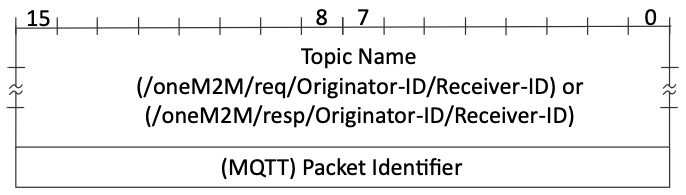

Figure 6.4.1.2‑1: Variable header for PUBLISH Packet
The Topic Name identifies the information channel to which payload data is published. The Topic Name for a oneM2M Request Message is specified at clause 6.4.2. The Topic Filter used to listen for and respond to a Request is specified at clause 6.4.3.
The Packet Identifier field is only present in PUBLISH Packets where the QoS level is 1 or 2.
The payload for the MQTT PUBLISH Packet is a oneM2M Request Message or Response Message as specified in clause 6.5.
A request is transmitted by sending it as an MQTT PUBLISH Packet to the MQTT Server. The MQTT Publish Packet uses a Topic Name that identifies both the Originator and the Receiver of the request as follows:
/oneM2M/req/
A Receiver listens for requests arriving via MQTT by subscribing using a wildcarded Topic Filter of the following form:
When it receives a request, the Receiver shall perform the Core Transport operations associated with the request, including any access control policy checks. In particular it shall check the request expiration timestamp (if any) contained in the request, since it is possible that that time might have passed while the message was being stored by MQTT.
It transmits a response by sending an MQTT PUBLISH Packet to a response topic. This takes the form:
The Originator shall subscribe to this Topic (either explicitly or using a wildcarded filter) in order to see the response.
The payload of the MQTT PUBLISH packet is used to carry the response primitive, as described in clause 6.5.
In some security scenarios, an Originator might not initially know its AE-ID or CSE-ID. Initial registration exchanges can use the communication pattern described in clauses6.4.1 and 6.4.2 except that they use Topics containing a credential ID rather than an AE-ID or CSE-ID, as follows:
and
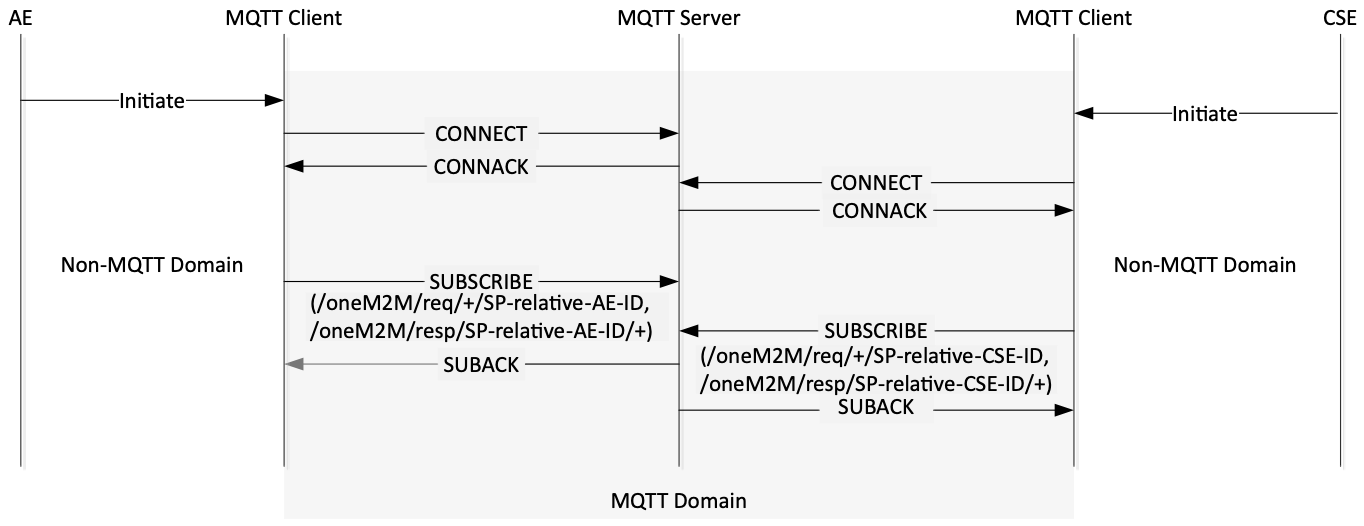

Figure 6.4.5‑1: Initiating Process in MQTT binding
In the MQTT protocol, each client shall subscribe to the MQTT server to receive messages. As shown in figure 6.4.5‑1, the AE or CSE initiates the MQTT binding process by trying to connect to the MQTT server, as described in clause 6.3.
After each MQTT client successfully connects to the server, it shall subscribe to the MQTT server. The Topic Filters with which each MQTT client subscribes are "/oneM2M/req/+/
Accordingly the plus sign ('+' U+002B) wildcard and the SP-relative-AE-ID or SP-relative-CSE-ID are used in the Topic Filter within the MQTT SUBSCRIBE Packet. This enables the MQTT client to receive the PUBLISH Packets whose target it is. Therefore, through this process, the AE or CSE receives messages if the request/response messages are published to "/oneM2M/req/
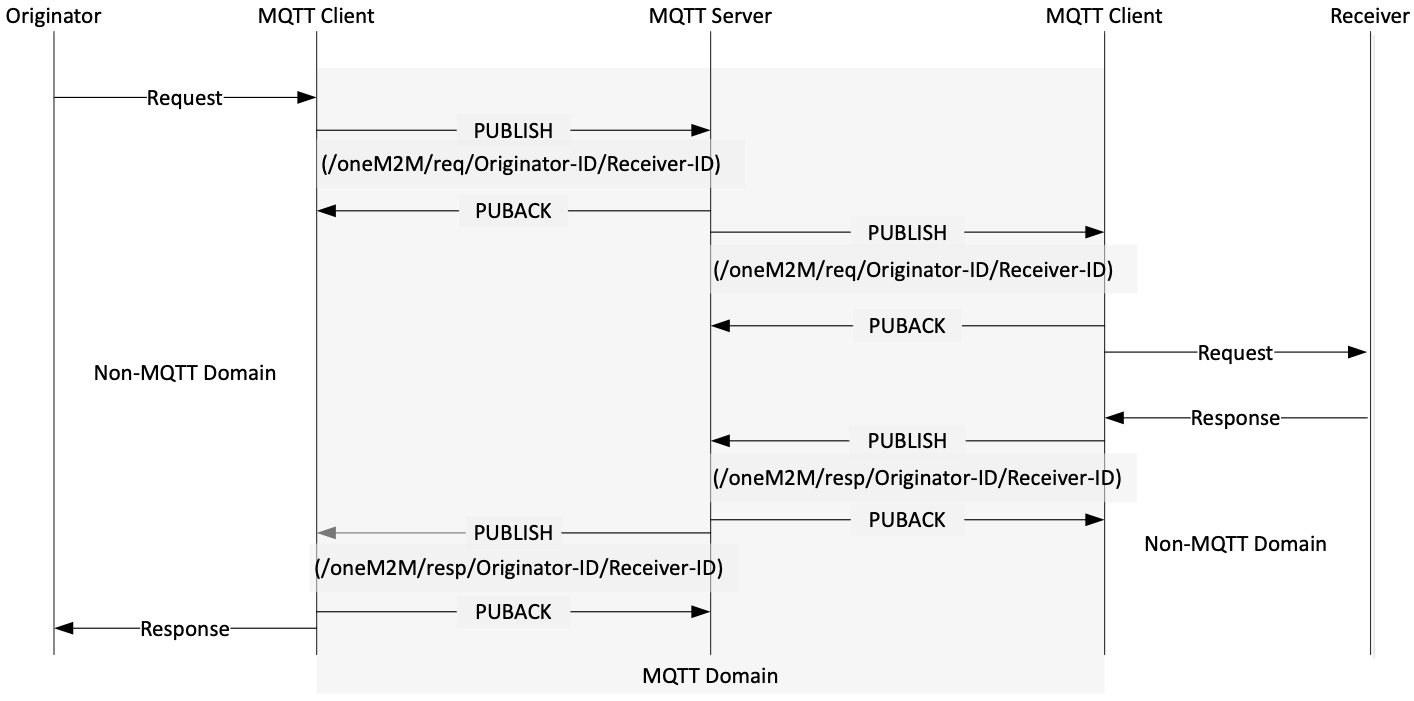

Figure 6.4.5‑2: Request/Response message delivery over MQTT
As an example, Figure 6.4.5‑2 illustrates the Request / Response message delivery over MQTT protocol between Originator and Receiver via the Mca/Mcc reference point in oneM2M. The message flow is as follows.
In this flow, the Originator wants to send a Request message to the Receiver. The Originator's MQTT client library sends an MQTT PUBLISH Packet to the MQTT server with "/oneM2M/req/SP-relative-AE-ID/SP-relative-CSE-ID/
The MQTT PUBLISH packet shall include {"op", "fr", "to", "rqi"} and any optional parameters in accordance with the operation (CREATE, RETRIEVE, UPDATE, DELETE, NOTIFY) as specified in clause 7.2.1.1 of oneM2M TS-0004 [3] in its payload.
When the MQTT server receives the MQTT PUBLISH Packet from the MQTT client, the server refers to the Topic Name and delivers the message to the intended MQTT client. Finally, the MQTT client library delivers the message to the Receiver.
After that, the Receiver builds a Topic Name for the Response message of the form "/oneM2M/resp/Originator-ID/Receiver-ID/
A oneM2M request primitive is made up of a number of control parameters and (optionally) a content part. All the parameters in these parts are serialized into the payload of an MQTT Publish Packet, using the rules given in clause 8 of oneM2M TS-0004 [3] applied to m2m:requestPrimitive defined in clause 6.4.1 of oneM2M TS-0004 [3].
All the parameters that are present in the primitive shall be serialized, in particular the request shall contain the mandatory parameters such as Operation, To, From, Request Identifier as specified in clause 8.1.2 of oneM2M TS-0001 [2] and 7.1.1.1 of oneM2M TS-0004 [3].
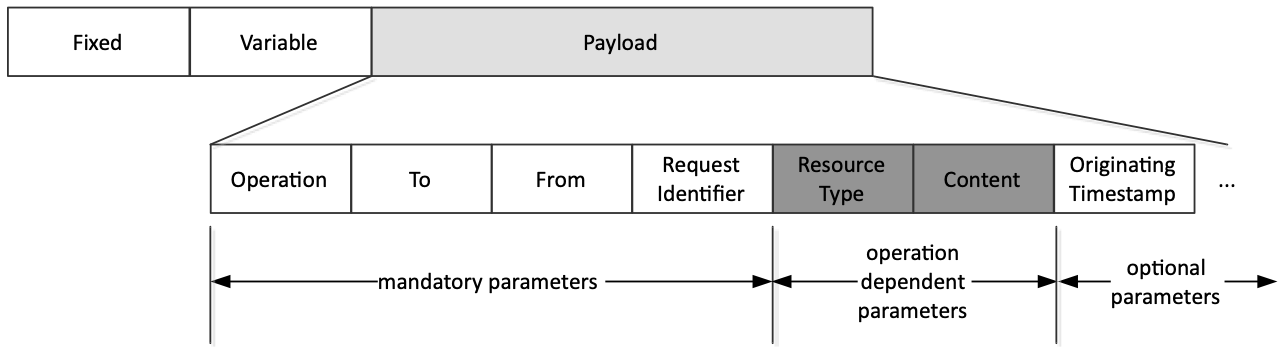

Figure 6.5.1‑1: MQTT Request example
An example of an MQTT Request message serialized using JSON is:
{
 "op": 1,
 "to": "//xxxxx/2345",
 "fr": "//xxxxx/99",
 "rqi": "A1234",
 "ty": 18,
 "pc": {
        "m2m:sch":{
                  "rn": "schedule1",
                  "se": {
                         "sce": ["* 0-5 2,6,10 * * * *"]
                        }
                  }
        },
 "ot": 20150910T062032
}A oneM2M response primitive is serialized using the rules given in clause 8 of oneM2M TS-0004 [3] applied to m2m:responsePrimitive defined in clause 6.4.2 of oneM2M TS-0004 [3].
In particular, each response primitive shall include the Response Status Code parameter to indicate success or failure of the operation and the Request Identifier parameter.
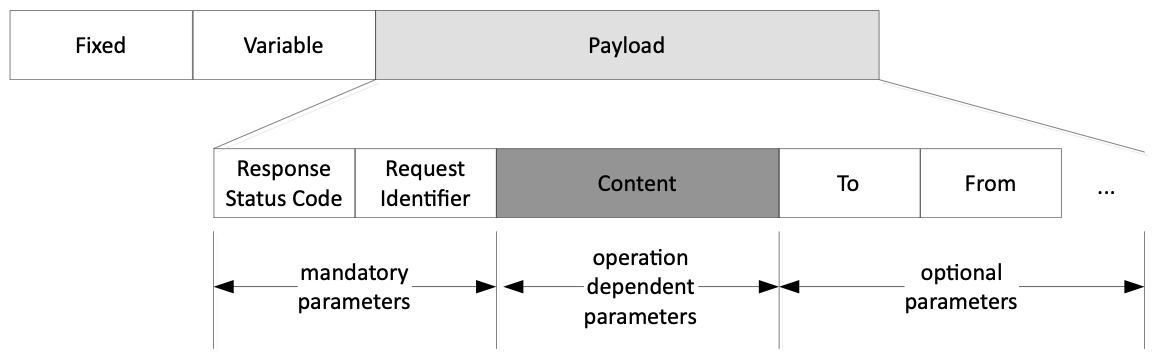

Figure 6.5.2‑1: MQTT Response example
An example of an MQTT Response message serialized using JSON is:
{
 "rsc": 2000,
 "rqi": "A1234",
 "pc": {
         "m2m:sch": {
                    "se": {
                            "sce": ["* 0-5 2,6,10 * * * *"]
                          }
                    }
        },
 "to": "//xxxxx/2345",
 "fr": "//xxxxx/99"
}When sending a response primitive over MQTT, the Receiver should use the same serialization that was used in the corresponding request primitive.
An MQTT message payload contains a oneM2M request or response primitive which is serialized using the XML, the JSON or the CBOR encoding given in clause 8 of oneM2M TS-0004 [3].
When an MQTT client publishes a message, it shall use a Topic name to indicate the format of the payload included in a PUBLISH message. As defined in clause 8 of oneM2M TS-0004 [3], the payload of request or response message shall include oneM2M primitives serialized using XML, JSON or CBOR.
The Topic name takes this form:
In order to receive a PUBLISH message with the Topic name, each MQTT client shall subscribe to the Topic name as follows:
In some figures in the present document, topic strings are shown that do not end with /json, /xml or /cbor. However the suffix /json, /xml, or /cbor shall always be used.
oneM2M defines an MQTT URL format to be used in the pointOfAccess attributes in several entity resource types (e.g.
oneM2M supports the following MQTT URL formats:
mqtt://mqtts://mqtt+ws://mqtt+wss://mqtt://mqtts://mqtt+ws://mqtt+wss://The
The formats with the scheme mqtt: indicate that TLS shall not be used when connecting to the MQTT server.
The formats with the scheme mqtts: indicate that TLS shall be used when connecting to the MQTT server.
The formats with the scheme mqtt+ws: indicate that MQTT over WebSocket (no TLS) shall be used when connecting to the MQTT server.
The formats with the scheme mqtt+wss: indicate that MQTT over WebSocket with TLS shall be used when connecting to the MQTT server.
If the
Table 6.6‑1: Default port numbers
Scheme
|
Port Number
|
|---|---|
mqtt:
|
1883
|
mqtts:
|
8883
|
mqtt+ws:
|
80
|
mqtt+wss:
|
443
|
The
A pointOfAccess attribute contains a list of one or more strings, each of which indicates a way in which that entity can be addressed. An entity can indicate support for MQTT by including one or more strings that use the formats defined in clause 6.6.2.
If there is a path component in a pointOfAccess string, the path is prepended to the topic strings defined in the present document.
EXAMPLES: An AE with AE-ID of "CAE01" would subscribe to MQTT topic strings as follows:
- If it has a pointOfAccess string mqtt://myserver.example it would subscribe to oneM2M/req/+/CAE01/# (see clause 6.5.4).
- If it has a pointOfAccess string mqtt://myserver.example/abc/def it would subscribe to abc/def/oneM2M/req/+/CAE01/#.
- If it has a pointOfAccess string mqtt://myserver.example//def/ghi it would subscribe to /def/ghi/oneM2M/req/+/CAE01/#.
- If it has a pointOfAccess string mqtt://myserver.example///uvw//xyz it would subscribe to //uvw//xyz/oneM2M/req/+/CAE01/#.
An MQTT URL that is used anywhere other than in a pointOfAccess attribute shall contain a path component. That path gives the entire MQTT topic string that is to be used (note that the "/" character preceding the path does not form part of the topic string). The structure of that topic string does not have to conform to any of the topic string patterns defined in the present document.
EXAMPLES:
- The URL mqtt://myserver.example/abc/def refers to the Topic abc/def on the MQTT server hosted on myserver.example.
- The URL mqtt://myserver.example//def/ghi refers to the Topic /def/ghi on the MQTT server hosted on myserver.example.
- The URL mqtt://myserver.example///uvw//xyz refers to the Topic //uvw//xyz on the MQTT server hosted on myserver.example.