6.3 Connecting to MQTT
6.3.0 Introduction
In order to communicate, the two client parties (AE and CSE or CSE and CSE) shall connect to a common MQTT server. The MQTT server shall be hosted in one of the two nodes or shall exist as an independent external entity, following one of the two scenarios shown in clause 5.2.
Once each party has located the address of the MQTT server, it then connects to it using the standard MQTT CONNECT Control Packet.
An MQTT Control Packet consists of up to three parts: a fixed header, a variable header, and a payload as shown in Figure 6.3.0-1.

Figure 6.3.0-1: Format of MQTT Control Packet
6.3.1 Variable header of MQTT CONNECT Packet
A variable header for the MQTT CONNECT Packet consists of four fields in the following order: Protocol Name, Protocol Level, Connect Flags and Keep Alive as shown in Figure 6.3.1-1.
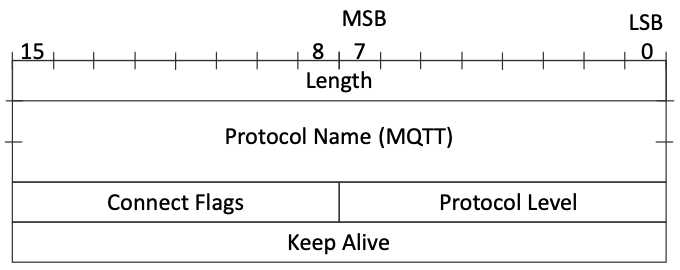
Figure 6.3.1-1: Variable header of MQTT CONNECT Packet
The value of Protocol Name field is "MQTT". The value of the Protocol Level field for the MQTT version 3.1.1 of the protocol is 4. The Connect Flags is shown in Figure 6.3.1-2. The Keep Alive is a time interval measured in seconds.

Figure 6.3.1-2: Connect Flags of variable header for MQTT CONNECT Packet
6.3.2 Payload of MQTT CONNECT Packet
A payload for the MQTT CONNECT Packet is determined by the Connect Flags in the variable header. These fields may consist of Client Identifier, Will Topic, Will Message, User Name, Password.
Mandatory fields to establish an MQTT session for oneM2M are:
Client Identifier
Optional fields to establish an MQTT session for oneM2M are:
User NamePassword
An example of payload of an MQTT CONNECT Packet is shown in Figure 6.3.2-1.

Figure 6.3.2-1: Example of an MQTT CONNECT Packet
6.3.3 Application of MQTT CONNECT Packet
The following additional considerations apply:
- Client Identifier: The CONNECT Packet contains a Client Identifier as described in clause 6.3.2. The Client Identifiers have to be unique at least among all clients that connect to a given MQTT server instance (this is a requirement imposed by the MQTT protocol). This condition will be satisfied if an AE uses its AE-ID and a CSE uses its CSE-ID. See clause 7 of oneM2M TS-0001 [2] for a discussion of these Identifiers. The prefix A:: or C:: shall be added to the ID to show whether it is an AE-ID or a CSE-ID as these ID spaces are not distinct.
The AE-ID or CSE-ID may not be known during the initial registration process, in which case the client shall use some other appropriate unique ID. - Connect Flags:
- A client shall set the "Clean Session" flag in the MQTT CONNECT Packet to false. This means that MQTT Session state related to that client will be retained by the MQTT Server in the event of a disconnection (deliberate or otherwise) of that client.
- A client shall not set the "
Will Flag", "Will QoS", or "Will Retain" soWill MessageandWill Topicshall not be present in the payload.
- Keep Alive: A client may choose to provide a non-zero MQTT Keep Alive value or to provide a Keep Alive of 0 (this disables the MQTT Keep Alive).
- User Name and Password: The MQTT server may require that a client provides a User Name and a password (or other credential). If the MQTT server authenticates by user name and password, the corresponding user name flag and password flag in the CONNECT shall be set to 1. For more information see clause 7 Security.
A client might choose to keep the MQTT connection open permanently (restarting it as soon as possible after any unforeseen connection loss), it might choose to connect only when it wants to act as an Originator, or it might choose to connect based on the <schedule> associated with a relevant oneM2M resource.
Once a client has connected to the MQTT server it can then communicate (subject to authorization policies) with any other client connected to its server. There is no need for it to create another connection if it wants to communicate with a different counter-party.
When a client determines that it no longer wishes to participate in an MQTT Session with its MQTT Server it shall perform the following steps:
- Disconnect from that server, if it is currently connected.
- Reconnect with the cleanSession flag set to true.
- Disconnect again.
These steps delete any state that the MQTT server might be holding on behalf of the client.